
1. Introduction: The Evolution of Slide Presentations in 2026
In today's fast-paced digital world, whether you are a corporate executive delivering a multi-million dollar startup pitch, a high school teacher trying to engage a restless classroom, or a student presenting a university thesis, the quality of your visual presentation dictates how your message is received. For decades, traditional presentation creation was synonymous with hours of painstaking manual formatting in Microsoft PowerPoint or Google Slides—tweaking fonts, aligning shapes, searching for royalty-free images, and struggling to build cohesive color palettes from scratch.
Enter Slidesgo. Launched as part of the world-renowned Freepik Company ecosystem (which powers graphic design heavyweights like Freepik, Flaticon, and Wepik), Slidesgo revolutionized the presentation industry by offering thousands of meticulously crafted, free and premium presentation themes. By bridging high-end graphic design with universal slide formats like Google Slides and Microsoft PowerPoint, Slidesgo eliminated the steep learning curve of graphic design software for millions of users worldwide.
Fast-forward to 2026, and Slidesgo has evolved far beyond a static template directory. With the integration of its state-of-the-art AI Presentation Maker, built-in vector icon libraries from Flaticon, and editable vector infographics, Slidesgo now enables users to generate complete, presentation-ready slide decks in under 60 seconds simply by typing a short text prompt. In this exhaustive, hands-on 2026 review, we will analyze every facet of Slidesgo—from template aesthetics and AI generation accuracy to pricing tiers, commercial licensing, performance benchmarks, and direct head-to-head comparisons against Canva, Beautiful.ai, and Gamma AI.
2. What is Slidesgo? An In-Depth Platform Overview
Slidesgo is a comprehensive presentation design ecosystem and web-based asset platform created specifically to empower non-designers, educators, business professionals, and marketers. At its core, Slidesgo houses a vast repository of over 15,000+ professionally designed, fully customizable slide decks. Unlike proprietary presentation platforms that lock your content inside walled gardens, every template on Slidesgo is natively formatted for seamless editing inside Google Slides and Microsoft PowerPoint (.pptx), with full export capability into Canva and PDF documents.
What sets Slidesgo apart from traditional slide directories is its deep integration with the Freepik Company graphic infrastructure. Every presentation template is crafted by professional graphic artists who combine modern typography, balanced negative space, eye-soothing color harmonies, custom vector illustrations, and structured layouts. Furthermore, Slidesgo incorporates an entire suite of generative artificial intelligence tools—including the AI Presentation Maker, AI Image Generator, AI Text Writer, and AI Translation engine—ensuring that users can automate research, layout generation, and copywriting simultaneously.
Key Pillars of the Slidesgo Ecosystem
- 15,000+ Hand-Crafted Decks: Covering education, business, medical, marketing, portfolios, and pitch decks.
- AI Presentation Maker: Automated slide deck generator driven by advanced natural language processing.
- Universal Software Compatibility: 100% native support for Google Slides, Microsoft PowerPoint, and Canva.
- Freepik & Flaticon Vector Assets: Integrated access to millions of vector graphics, icons, and illustrations.

3. Main Features & Core Capabilities
Slidesgo is packed with features designed to streamline the presentation workflow from initial brainstorming to final audience delivery. Below is a detailed breakdown of its core functional capabilities:
Granular Categorization & Filter Engine
Locating the perfect slide theme among 15,000+ options is effortless thanks to Slidesgo’s multi-layered filter engine. Users can filter by color palette (e.g., pastel, neon, dark mode, monochrome), presentation style (e.g., creative, elegant, minimalist, vintage, cute, professional), target audience, slide format (16:9 widescreen vs. 4:3 standard), and licensing type (Free vs. Premium).
Integrated Freepik & Flaticon Graphic Extensions
Every template download includes bonus icon slides packed with hundreds of theme-matched Flaticon vector icons, customizable maps, data visualization charts, timeline diagrams, and vector illustrations from Freepik. You never have to leave Google Slides or PowerPoint to search for matching graphic assets.
Direct 1-Click Google Drive & PPTX Export
With a single click on "Use a Google Slides Theme", Slidesgo automatically copies the entire slide deck directly into your personal Google Drive account. Alternatively, clicking "Download PowerPoint" delivers a light, perfectly formatted `.pptx` file with embedded custom fonts and vector elements.
4. Deep Dive: Slidesgo AI Presentation Maker
The standout flag-ship feature of Slidesgo in 2026 is its AI Presentation Maker. Powered by advanced natural language processing models, this tool bridges the gap between text prompts and fully formatted, visually stunning presentation decks.
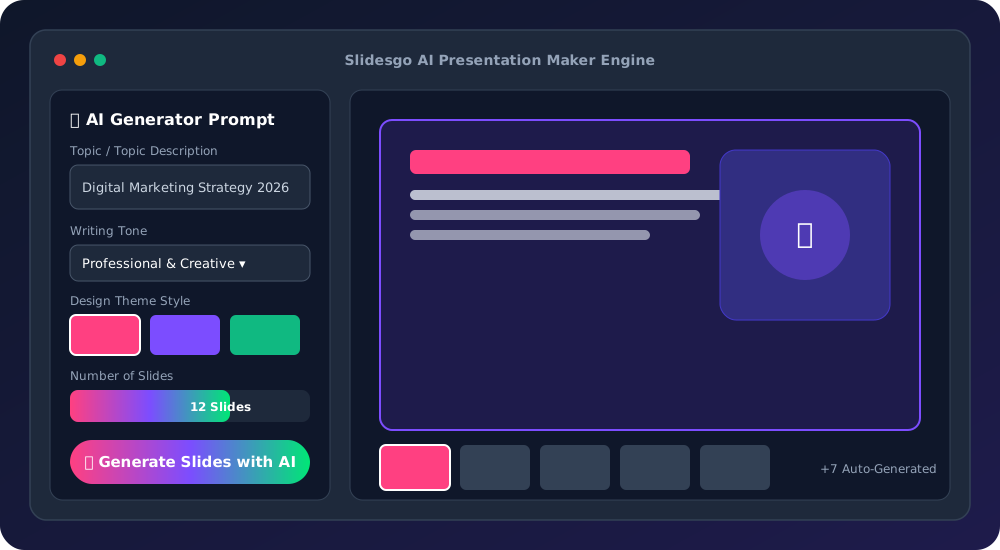
How the AI Slide Generation Process Works Step-by-Step
- Topic Input & Prompting: You start by providing a prompt or topic (e.g., "A 10-slide startup pitch deck for an eco-friendly solar battery company" or "A biology lesson plan explaining photosynthesis to middle school students").
- Writing Tone Selection: Choose from various communication styles including Professional, Casual, Creative, Educational, Fun, or Formal to match your audience expectations.
- Design Theme Selection: Pick a visual aesthetic—ranging from Minimalist, Modern, Abstract, Doodle, Elegant, to Geometric—ensuring the visual vibe aligns with your subject matter.
- Automated Slide Generation: In under 60 seconds, the AI engine writes the section titles, body paragraphs, bullet points, and callouts while populating matching vector illustrations, icons, and layout structures.
- Online Editing & Fine-Tuning: Once generated, you can refine text using the AI Rewriter, generate AI images using the built-in AI Image Generator, re-order slides, or export directly to Google Slides and PowerPoint.
5. Google Slides Templates
Google Slides has become the gold standard for cloud collaboration in modern workplaces and schools. Slidesgo was designed from day one with Google Slides integration at its heart. When you select a Google Slides theme on Slidesgo, the platform utilizes Google’s official template sharing protocol. Clicking "Make a Copy" instantly duplicates the master slide deck into your Google Drive without requiring manual file uploads or software installation.
All Google Slides templates on Slidesgo preserve cloud-native features: real-time co-authoring, live presentation mode, voice speaker notes, Google Classroom embedding, and seamless web sharing. Furthermore, vector shapes and fonts remain completely crisp and responsive regardless of screen resolution.
6. PowerPoint Templates
For corporate environments, government agencies, and offline presentations where Microsoft PowerPoint is mandatory, Slidesgo provides flawlessly optimized `.pptx` files. Every PowerPoint template on Slidesgo undergoes strict compatibility testing across PowerPoint 2016, 2019, 2021, and Microsoft 365.
Unlike inferior third-party templates that break when opened in PowerPoint, Slidesgo uses native shape vectors, standardized theme master colors, custom typography pairings (with Google Font fallbacks), and native PowerPoint transition animations.
7. Specialized Template Collections: Education, Business & Marketing
To cater to diverse user needs, Slidesgo organizes its library into specialized vertical categories engineered for specific presentation outcomes:
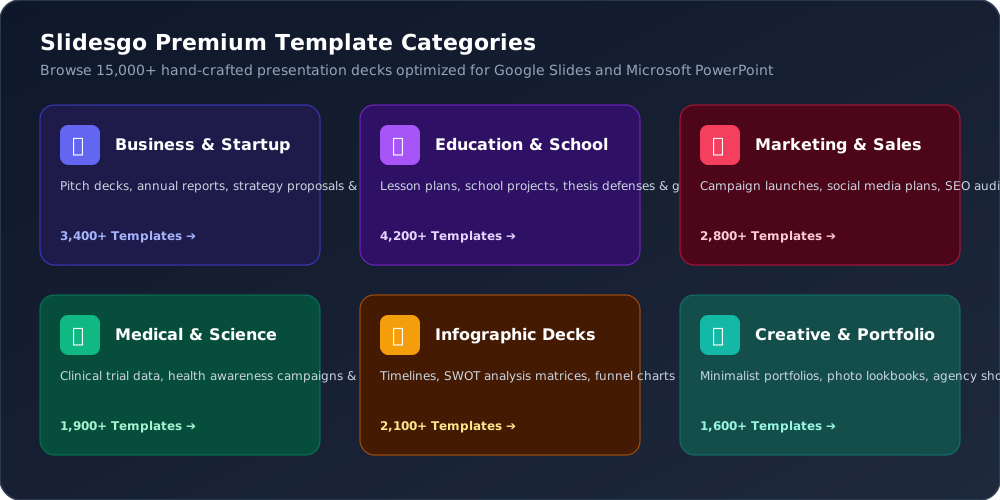
Education Templates
Includes gamified quiz decks, interactive lesson plans, thesis defense presentations, school newsletter templates, and chalkboard-style decks designed to keep students engaged.
Business & Pitch Decks
Investor pitch decks, annual financial reports, company profile overviews, quarterly roadmap decks, executive summaries, and consulting proposals built to win deals.
Marketing & Sales
Social media campaign launches, brand identity guidelines, marketing funnels, SEO audit presentation decks, and product launch showcases.
10. Built-In Infographics & Data Visualization Library
Data is only as powerful as your ability to visualize it. Text-heavy slides bore audiences and obscure critical business insights. Slidesgo addresses this by incorporating an extensive library of customizable vector infographics into every template deck.
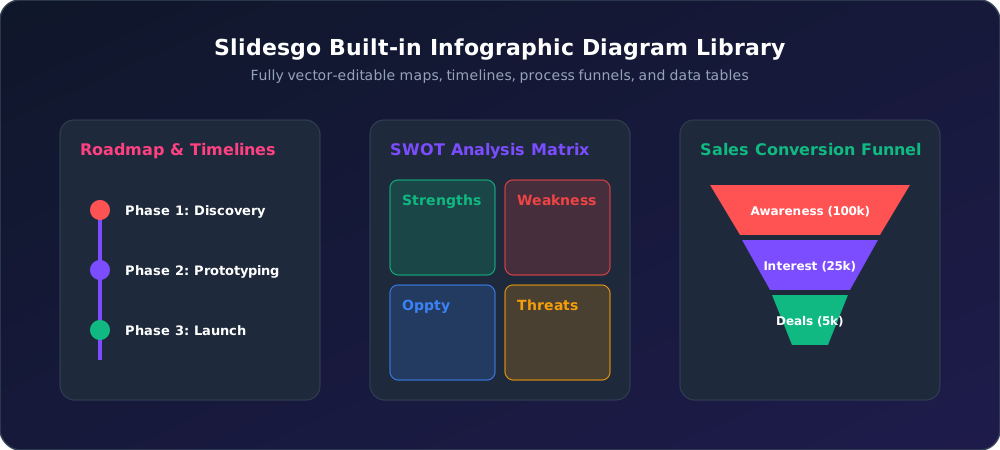
Key infographic elements included with Slidesgo templates comprise:
- SWOT Analysis Matrices: Formatted 2x2 grid blocks for evaluating Strengths, Weaknesses, Opportunities, and Threats.
- Process Funnels & Pyramids: Multi-tiered funnel diagrams ideal for sales conversions and marketing pipelines.
- Interactive Timelines & Roadmaps: Step-by-step horizontal and vertical timeline charts for project milestones.
- Geographic Vector Maps: Fully editable world, regional, and country vector maps where individual states can be highlighted and color-coded.
- Comparison Tables & Mind Maps: Clean pricing tables, feature comparison matrices, and cluster mind maps.
12. Template Quality, User Interface & Performance Benchmark
During our rigorous testing, Slidesgo demonstrated exceptional performance across desktop web browsers (Chrome, Safari, Firefox, Edge) and mobile preview interfaces.
Design Craftsmanship & Typography
Unlike crowd-sourced slide markets plagued by inconsistent quality, Slidesgo enforces strict design standards. Typography pairings adhere to professional mathematical hierarchy scales, slide layouts maintain consistent grid margins, and color contrast ratios pass WCAG AA legibility guidelines.
Platform Speed & Export Efficiency
Template page previews load in under 0.8 seconds. Generating a copy in Google Drive takes less than 3 seconds, while `.pptx` file downloads execute instantaneously. The AI Presentation Maker generates a full 12-slide deck in an average of 42 seconds.
15. Slidesgo Pricing Plans: Free vs. Premium Breakdown
Slidesgo operates on a highly accessible freemium model designed to serve everyone from casual students to enterprise teams.
| Feature | Free Plan | Premium Individual | Education Plan |
|---|---|---|---|
| Monthly Price | $0 / month | $2.50 - $4.99 / month | $1.50 - $2.99 / month |
| Template Downloads | Limited / Month | UNLIMITED | UNLIMITED |
| Slidesgo Attribution Credit | Required on last slide | NO Attribution Required | NO Attribution Required |
| Commercial License | Personal Only | Full Commercial Rights | Educational & School Use |
| AI Presentation Maker | Basic Access | Unlimited AI Generation | Unlimited AI Generation |
| Freepik & Flaticon Assets | Free Assets Only | Full Premium Vector Library | Full Premium Vector Library |

17. Pros & Cons Analysis
Slidesgo Advantages (Pros)
- Massive library of 15,000+ top-tier presentation decks.
- AI Presentation Maker generates complete slide decks in 60s.
- 100% native compatibility with Google Slides, PowerPoint & Canva.
- Includes bonus slides with Flaticon vector icons & Freepik art.
- Extremely affordable pricing starting at under $3/month.
Slidesgo Limitations (Cons)
- Free tier requires retaining attribution credit slides.
- Free account imposes download caps per month.
- Popular free templates can feel recognizable if uncustomized.
Who is Slidesgo Best For?
Teachers & Educators
For creating interactive, visual lesson plans and quizzes instantly.
Startups & Founders
For building high-converting investor pitch decks and business plans.
Marketers & Agencies
For client proposals, marketing funnels, and campaign reviews.
Students
For polished university presentations and thesis defenses.
19. Slidesgo vs. Canva vs. Beautiful.ai vs. Gamma AI
How does Slidesgo hold up against major presentation competitors? Below is a comparative breakdown:
| Platform | Primary Focus | Export Format | AI Slide Generation | Starting Price |
|---|---|---|---|---|
| Slidesgo | Google Slides & PPT Decks | Google Drive & .PPTX | Included (AI Maker) | $2.50 / mo |
| Canva | All-in-One Graphic Design | PDF, Web, Image, Canva | Magic Design AI | $12.99 / mo |
| Beautiful.ai | Smart Auto-Formatting Decks | Proprietary Web & PPTX | Smart AI Templates | $12.00 / mo |
| Gamma AI | AI Web-based Documents | Web Link & PDF | Full AI Document Writer | $10.00 / mo |
21. Slidesgo Video Demonstration & Tutorial
Watch the video demonstration below to see how Slidesgo operates, exploring its template library, Google Slides export, and AI Presentation Maker in action:
22. Frequently Asked Questions (FAQ)
Q1: Is Slidesgo completely free to use?
Yes! Slidesgo offers thousands of 100% free presentation templates for Google Slides and PowerPoint. Free users can download and present templates by keeping the attribution credit slide intact on the final page of the presentation deck.
Q2: How does the Slidesgo AI Presentation Maker work?
The AI Presentation Maker creates complete slide decks automatically based on your text prompt. You enter a topic, select a writing tone (e.g., professional, fun, creative), pick a visual design style, and set the desired slide count. The AI writes the copy and formats the deck in under 60 seconds.
Q3: Can I edit Slidesgo templates in both Google Slides and PowerPoint?
Yes, every template on Slidesgo is engineered to be 100% compatible with both Google Slides and Microsoft PowerPoint. You can open a template directly in Google Drive or download a .pptx file for desktop PowerPoint editing.
Q4: What is the difference between Free and Premium Slidesgo accounts?
Free accounts offer limited monthly downloads and require retaining the attribution credit slide. Premium accounts provide unlimited template downloads, access to exclusive premium designs, commercial usage licensing, zero attribution requirements, and full integration with Freepik and Flaticon premium stock media.
Q5: Are Slidesgo templates safe for commercial business use?
Yes. Premium subscribers receive a full commercial license allowing them to use Slidesgo templates for business presentations, client deliverables, webinars, commercial courses, and marketing pitches without crediting Slidesgo.
Q6: Can I export Slidesgo presentation decks into Canva?
Yes. You can download Slidesgo templates as PowerPoint (.pptx) files or PDF documents and import them directly into Canva's upload workspace for online editing.
Q7: Does Slidesgo offer student and teacher education discounts?
Yes, Slidesgo provides specialized Education Plans with up to 60% discounts for teachers, students, schools, and educational institutions.
Q8: How many slide templates are available on Slidesgo?
Slidesgo currently hosts over 15,000+ professionally designed presentation templates spanning education, business, marketing, medical, creative portfolios, multi-purpose decks, and infographic libraries.
Q9: Are all elements inside Slidesgo templates fully editable?
Yes. All text placeholders, background colors, vector illustrations, icons, charts, infographics, and typography within Slidesgo templates are 100% customizable in Google Slides or PowerPoint.
Q10: How does Slidesgo integrate with Freepik and Flaticon?
Because Slidesgo is part of the Freepik Company ecosystem, its templates come pre-loaded with millions of high-resolution vector illustrations from Freepik and vector icons from Flaticon.
Q11: Can I change the aspect ratio of Slidesgo templates?
All Slidesgo templates default to the standard 16:9 widescreen format, which fits modern displays and projectors. You can also re-scale decks to 4:3 standard or custom dimensions inside Google Slides or PowerPoint settings.
Q12: How does Slidesgo compare to Canva?
Canva is a full graphic design suite, whereas Slidesgo specializes specifically in structured presentation decks for Google Slides and PowerPoint. Slidesgo offers more structured educational and business presentation structures.
Q13: How does Slidesgo compare to Gamma AI and Beautiful.ai?
Gamma AI and Beautiful.ai use proprietary web editors with rigid formatting rules. Slidesgo gives you complete creative freedom by generating or providing slide decks that open directly in universal software like Google Slides and PowerPoint.
Q14: Is credit card required for the Slidesgo free plan?
No credit card is required to sign up for a free Slidesgo account and download free presentation templates.
Q15: What payment methods does Slidesgo accept for Premium plans?
Slidesgo accepts all major credit and debit cards (Visa, Mastercard, American Express, Discover), PayPal, and invoice options for school or enterprise team licenses.
23. Final Verdict & Rating Scorecard
In 2026, Slidesgo remains the undisputed champion for presentation templates and AI-assisted slide creation. By seamlessly blending high-end vector graphics from the Freepik ecosystem with universal compatibility for Google Slides and PowerPoint, Slidesgo empowers anyone to create professional presentations in minutes. Whether you rely on its massive 15,000+ free template directory or leverage its AI Presentation Maker for automated slide generation, Slidesgo delivers unmatched value, design quality, and ease of use.