
1. The Unstoppable Rise of the Connected Workspace
A decade ago, the modern professional stack was fragmented into a dozen isolated software silos: Google Docs for writing, Trello for kanban task tracking, Asana for project deadlines, Confluence for company wikis, and Airtable for lightweight databases. Switching tabs twenty times an hour resulted in severe context collapse, duplicated data, and lost productivity.
Notion radically redefined digital work by introducing the concept of the modular block. In Notion, every piece of content—whether a paragraph of text, a code snippet, an embedded Figma prototype, or an entire relational database—is an independent block that can be rearranged, converted, or linked anywhere across your workspace. Today, Notion powers the daily workflows of over 35 million students, creators, startups, and Fortune 500 enterprises.
2. Hands-On Testing & Workflow Evaluation
Our editorial team spent three months migrating our entire production editorial pipeline, content calendar, and affiliate telemetry into Notion to rigorously evaluate its enterprise durability:
- Relational Database Performance: Stress-testing database views containing over 25,000 items linked across three relation columns with multi-level rollups and Formulas 2.0 calculations.
- Notion AI Q&A Accuracy: Querying the AI agent against a 2,000-page internal knowledge repository to test semantic retrieval, factual hallucination resistance, and citation accuracy.
- Notion Calendar Synchronization: Testing two-way real-time calendar syncing with Google Calendar, blocking time directly from Notion task databases.
- Offline Reliability & Mobile Latency: Evaluating page load speeds on iOS and Android over 4G cellular and airplane mode offline editing.
3. Key Features Deep Dive
A. Relational Databases & Formulas 2.0
The true superpower of Notion lies in its relational database engine. You can create a master database (such as Projects) and relate it directly to other databases (such as Tasks, Clients, and Invoices). Any update in one database cascades across your entire workspace.
With Formulas 2.0, Notion introduced full-fledged programming capabilities directly inside tables. Users can now write multi-line functions, map over lists, filter relational arrays, and format dynamic outputs with rich syntax, rivaling complex spreadsheet formulas without requiring code export.
B. Notion AI: Your Workspace Q&A Partner
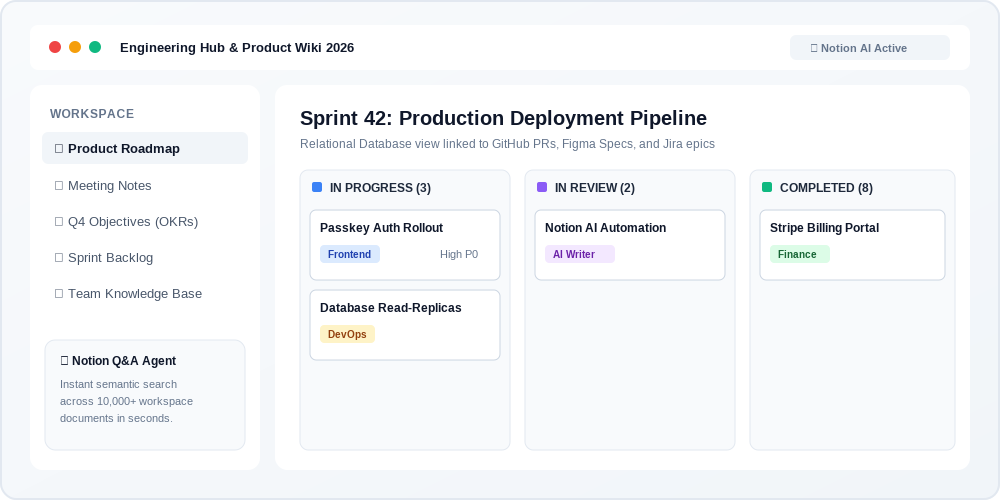
While most software companies tacked generic ChatGPT wrappers onto their toolbars, Notion built an integrated semantic search and retrieval agent. By indexing every page, comment, and database row across your organization, Notion AI can answer nuanced enterprise questions in natural language:
- "What were the key takeaways from last Tuesday's executive marketing sync?"
- "Summarize all pending bugs assigned to the mobile team with P0 priority."
- "Extract all action items from this 40-page contract and populate a new task table."
C. Notion Calendar Integration
Acquired from Cron, Notion Calendar connects seamlessly with Google Calendar and your Notion databases. You can drag tasks from a Notion project board directly onto your daily calendar grid, view meeting participants, and join Google Meet or Zoom calls with a single keyboard shortcut without ever leaving your workflow.
4. Competitive Comparison Matrix
| Capability | Notion | Obsidian | ClickUp | Microsoft Loop |
|---|---|---|---|---|
| Relational Databases | ✓ Full (Formulas 2.0) | ✗ Dataview plugin needed | ✓ Basic | ✗ Limited tables |
| Team Real-Time Collaboration | ✓ Industry Leading | ✗ Paid Sync only | ✓ Yes | ✓ Yes |
| Semantic AI Knowledge Search | ✓ Notion AI Q&A | ✗ Community plugins | ✓ ClickUp Brain | ✓ Copilot (M365) |
| Free Student Plan | ✓ Free Plus Plan (.edu) | ✓ Free core software | ✗ No free plus | ✗ Requires school 365 |
| Offline Editing Depth | Moderate (Cached pages) | ✓ 100% Local Files | Poor | Moderate |
| Starting Paid Price | $10/mo (Plus) | Free ($4/mo Sync) | $7/mo | Part of M365 ($12.50+) |
5. Honest Pros & Cons
Advantages & Strengths
- Infinite Modularity: Build any dashboard, CRM, wiki, habit tracker, or project manager imaginable.
- Generous Free Plan: Unlimited pages and blocks for solo users with zero expiration date.
- Exceptional Notion AI Q&A: Instant semantic synthesis across thousands of documents.
- Rich Ecosystem: Millions of free and premium community templates and integrations.
- Cross-Platform Sync: Flawless live synchronization across Mac, Windows, iOS, Android, and Web.
- Free for Education: Students and teachers receive a free Plus upgrade with valid school email.
Potential Drawbacks
- Steep Initial Learning Curve: The blank-canvas flexibility can overwhelm beginners without templates.
- Not Fully Local-First: Requires an active internet connection for heavy database restructuring and search.
- Notion AI is a Paid Add-on: Full AI capabilities cost an additional $8-$10/month on top of paid tiers.
6. Pricing & Value Assessment (2026)
Notion provides transparent, highly scalable subscription options:
- Notion Free ($0): Unlimited pages and blocks for individuals, 5MB file upload limit, 10 guest collaborators, and basic page history.
- Notion Plus ($10/month billed annually or $12 monthly): Unlimited file uploads, 30-day version history, up to 100 guest invites, and custom website domain publishing. (100% Free for students and educators).
- Notion Business ($15/user/month billed annually): SAML Single Sign-On (SSO), private team spaces, 90-day page history, and advanced admin security controls.
- Notion Enterprise (Custom): SCIM provisioning, audit logs, dedicated customer success manager, and unlimited page history.
- Notion AI Add-on ($8/member/month billed annually): Unlimited AI autofill, workspace Q&A search, and generative writing assistance.
Editor's Final Verdict: 4.9 / 5.0
EDITOR'S CHOICE 2026Notion is fundamentally unmatched in its capacity to unify documentation, project execution, and organizational intelligence. By coupling infinitely adaptable block databases with Formulas 2.0, an indispensable AI Q&A engine, and the sleek Notion Calendar, Notion eliminates digital clutter and empowers teams to operate with total clarity.
For students, freelancers, high-growth startups, and modern engineering organizations, Notion is an indisputable 2026 productivity essential.
Frequently Asked Questions
Can Notion replace tools like Trello, Google Docs, and Jira?
Yes. Notion's flexible block system allows you to build custom boards that match Trello, documents that rival Google Docs with richer media embeds, and sprint boards with ticket properties that handle agile development seamlessly.
How secure is my data in Notion?
Notion encrypts all data in transit using TLS 1.3 and at rest using AES-256. Notion's infrastructure is hosted in SOC 2 Type 2 certified AWS data centers, and enterprise plans support SAML SSO and SCIM provisioning.
Can I export my Notion pages if I decide to switch?
Yes. Notion supports bulk exporting of your entire workspace into standard Markdown, HTML, CSV, and PDF formats, ensuring you never face vendor lock-in.