

1. The Post-Production Revolution
For decades, video editing, visual effects compositing, color correction, and audio mastering required multiple disconnected applications from Adobe, Apple, and Avid. Exporting XMLs, roundtripping EDL timelines, and battling broken color conform workflows was the dreaded tax of high-end filmmaking.
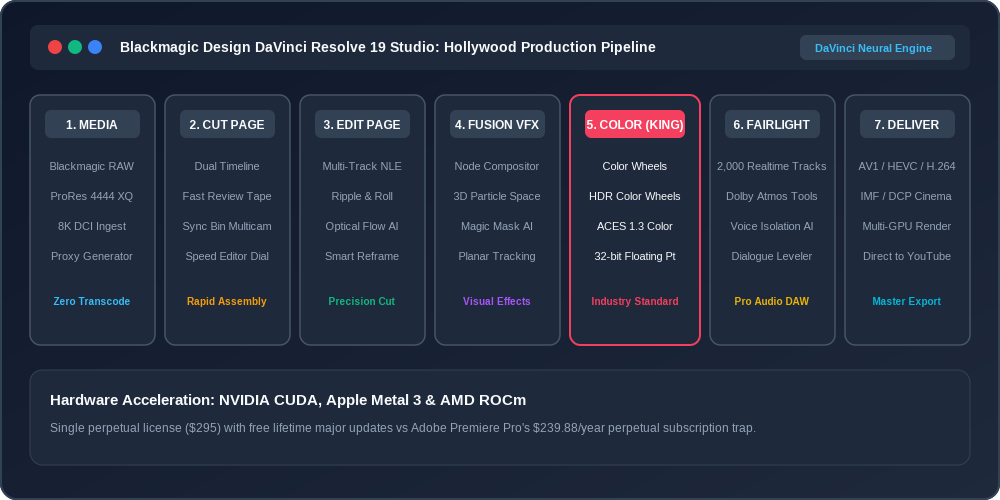
Blackmagic Design's DaVinci Resolve 19 eradicated this fragmented legacy by unifying seven dedicated creative studios into a single seamless software application. Today, DaVinci Resolve is the undisputed industry standard for color grading on Hollywood blockbusters (from Marvel epics to Netflix flagship dramas), commercial advertising, and YouTube creator channels alike.
2. Hands-On Benchmark & Real Timeline Testing
We stress-tested DaVinci Resolve 19 Studio across high-demand real-world video workflows:
- 8K Cinema Timeline Playback: Scrubbing multi-stream 8K 60fps Blackmagic RAW (BRAW) and 4K ProRes 4444 XQ without generating proxy files on an Apple M3 Max and NVIDIA RTX 4090 workstation.
- DaVinci Neural Engine AI Isolation: Testing Magic Mask 2.0 to isolate actors, track fast motion, and replace backdrops in under two seconds per frame.
- Voice Isolation & Audio Denoise: Cleaning up wind noise and acoustic echo on documentary dialogue tracks inside Fairlight.
- Render Speed Benchmark: Comparing H.265/AV1 export speeds against Adobe Premiere Pro 2026.
3. Key Features Deep Dive
A. Color Page: The Hollywood Standard
No video software on Earth rivals DaVinci's Color Page. Built on a node-based architecture operating in 32-bit floating point precision with ACES 1.3 and DaVinci YRGB Color Managed color science, colorists possess absolute control over primary wheels, HDR zones, custom curves, qualifier selections, and 3D LUTs. Even pushed to extremes, highlight roll-off and skin tones remain impeccably natural without digital banding or artifacting.
B. DaVinci Neural Engine: Practical AI for Filmmakers
Unlike gimmicky AI filters, DaVinci Resolve Studio leverages machine learning for laborious post-production tasks:
- Magic Mask 2.0: Stroke an actor or subject with a single brush line to generate an automated rotoscoped alpha matte that tracks across the entire clip.
- Voice Isolation: Instantly eliminates loud street traffic, air conditioner hum, and room reverb from speech while preserving crisp vocal fidelity.
- Smart Reframe: Automatically tracks focal subjects to crop widescreen 16:9 cinema footage into vertical 9:16 reels for social media without manual keyframing.
- SuperScale: Upscales vintage 1080p footage to 4K or 8K resolution using deep neural reconstruction.
C. Fairlight Audio: A Full Professional DAW Inside Your Editor
Fairlight is not a basic audio mixer; it is a full-fledged Digital Audio Workstation (DAW) capable of driving up to 2,000 real-time audio tracks with 6-band parametric EQ, expander/gate, and compressor dynamics on every single channel. It includes native Dolby Atmos spatial audio mixing, ADR automated dialogue replacement, and full support for VST3 and AU plugins.
4. Competitive Comparison Matrix
| Capability | DaVinci Resolve 19 | Adobe Premiere Pro | Final Cut Pro | Filmora 15 |
|---|---|---|---|---|
| License Model | Free / $295 Perpetual | $239.88/yr Subscription | $299.99 Perpetual | $49.99/yr or $79.99 |
| Color Grading Prowess | ★ Undisputed King | Lumetri (Basic) | Color Wheels (Good) | Presets / LUTs |
| Integrated VFX Compositor | ✓ Fusion (Node-based) | ✗ Requires After Effects | ✗ Motion (Separate) | Basic Effects |
| Integrated Audio DAW | ✓ Fairlight (2000 tracks) | ✗ Requires Audition | Basic Audio | Basic Audio |
| Platform Support | Windows, Mac, Linux | Windows, Mac | Mac only | Windows, Mac |
5. Honest Pros & Cons
Advantages & Strengths
- Incredible Free Version: 4K editing and full color wheels with zero watermarks or ads.
- No Subscription Extortion: Pay $295 once and enjoy free major lifetime upgrades forever.
- Supreme Color Grading: The undisputed gold standard used by major film studios.
- All-in-One Studio Architecture: No roundtripping between separate audio and VFX programs.
- Hardware GPU Efficiency: Blistering multi-GPU rendering with CUDA, Metal, and ROCm.
Potential Drawbacks
- High Hardware Demands: Requires a dedicated GPU with at least 8GB to 16GB VRAM for smooth 4K/8K playback.
- Node-Based VFX Learning Curve: Fusion nodes take time to master for users accustomed to layer-based editors.
6. Pricing & Lifetime Value Assessment
Blackmagic Design's business model is a breath of fresh air in an industry dominated by endless recurring subscriptions:
- DaVinci Resolve Free ($0): Complete multi-track NLE editor, full Color Page, Fusion VFX, Fairlight audio, and exports up to 4K UHD 60fps with zero watermarks.
- DaVinci Resolve Studio ($295 One-Time Purchase): DaVinci Neural Engine AI, multi-GPU rendering, 32K 120fps mastering, Dolby Vision HDR, temporal noise reduction, and lifetime free upgrades across all future releases.
Editor's Final Verdict: 4.9 / 5.0
EDITOR'S CHOICE 2026DaVinci Resolve 19 is a monumental engineering feat. By merging Hollywood-caliber color science, an increasingly swift NLE, node-based Fusion visual effects, and Fairlight audio DAW into a single perpetual license software package, Blackmagic Design has created the ultimate post-production solution.
If you are tired of paying Adobe hundreds of dollars every single year, switching to DaVinci Resolve is the single best decision you can make in 2026.
Frequently Asked Questions
Can my computer run DaVinci Resolve 19?
For smooth HD and 4K editing, Blackmagic recommends at least 16GB of system RAM (32GB for Fusion VFX), a fast NVMe SSD, and a dedicated GPU (NVIDIA RTX 3060+, Apple M-series Pro/Max, or AMD Radeon 6700XT+) with at least 6GB to 8GB of VRAM.
Can I import projects from Adobe Premiere Pro or Final Cut Pro?
Yes. DaVinci Resolve features robust XML, EDL, and AAF import engines that accurately translate cut points, transitions, and audio sync from Premiere Pro and Final Cut Pro timelines.
Does DaVinci Resolve Studio require an internet connection to work?
No. DaVinci Resolve Studio can be activated via a permanent digital license key or physical USB dongle and runs completely offline with zero telemetry or forced online check-ins.