

Box Review 2026 – AI-Powered Content Management Platform for Secure File Storage & Team Collaboration
Get Up to 25% OFF Box Business & Enterprise Plans
Unlock unlimited cloud storage, Box AI document intelligence, native Box Sign e-signatures, and 1,500+ integrations with a 14-day free trial.
1. What is Box? Redefining Enterprise Content Management
When evaluating modern workplace technology, one fundamental misconception frequently arises: many professionals assume Box is simply another consumer cloud drive similar to basic file hosting services. That perspective fails to capture what Box actually is today. Box is an enterprise-grade AI-Powered Intelligent Content Management Platform engineered to manage, protect, and automate the entire content lifecycle for businesses, remote teams, and global organizations.
Founded in 2005 by Aaron Levie and Dylan Smith, Box recognized early on that corporate content—ranging from confidential legal contracts, financial audits, and medical records to CAD designs and marketing media—requires far more than simple storage. It demands an intelligent content cloud that bridges the gap between unstructured data and active business productivity.
Today, the Box Content Cloud provides a single centralized platform where organizations can securely store files, collaborate in real time using Box Notes and Box Canvas, stream desktop files via Box Drive, execute legally binding e-signatures with Box Sign, automate complex approval workflows with Box Relay, and extract generative insights using Box AI—all safeguarded by zero-trust encryption and strict regulatory compliance standards.
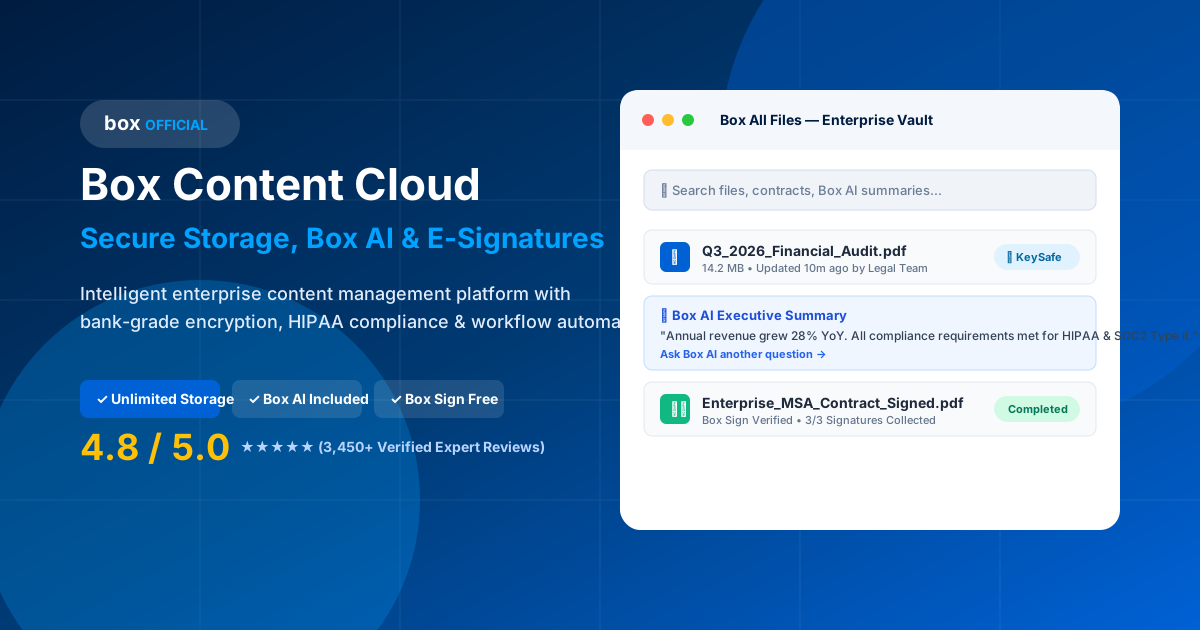
Figure 1: The Box Intelligent Content Management Platform unifying storage, collaboration, AI, e-signatures, and governance.
2. Why Businesses and Enterprises Choose Box
More than 115,000 organizations globally—including 67% of the Fortune 500—rely on Box as their core digital content hub. The shift toward hybrid work environments and rigorous privacy regulations has forced IT leaders to abandon fragmented point solutions in favor of a unified content infrastructure.
Zero Trust Security Governance
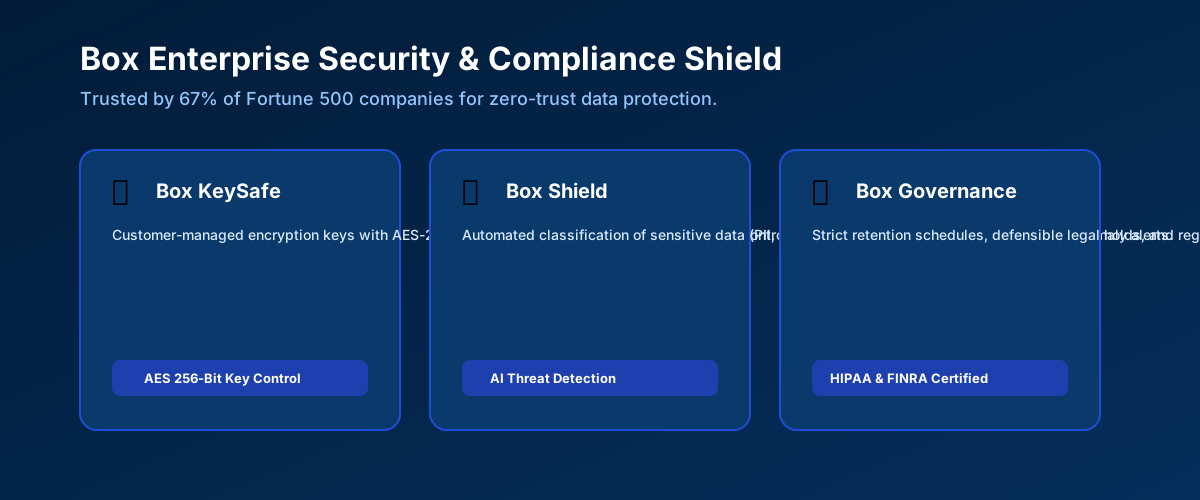
Box provides customer-managed encryption keys (Box KeySafe), automated data classification, and ransomware detection via Box Shield, giving enterprises full control over their sensitive IP.
Elimination of Software Silos
Instead of paying separate subscriptions for cloud storage, e-signature tools (like DocuSign), whiteboarding apps, and document AI plugins, Box consolidates everything into one plan.
1,500+ Neutral Integrations
Box fits seamlessly into any tech stack. Employees can edit Microsoft Office documents, co-author Google Docs, send Slack files, and sign contracts inside Salesforce without leaving Box.
3. Secure Cloud Storage Architecture & Capacity
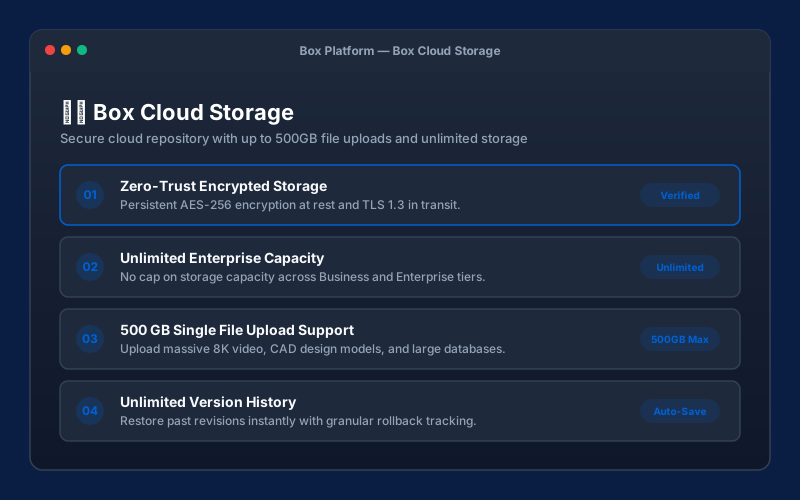
At its foundation, Box delivers robust secure cloud storage backed by AES 256-bit encryption for data at rest and TLS 1.3 protocol for data in transit. Unlike traditional hard drives or network-attached storage (NAS) devices that require manual backups and vulnerability patching, Box operates a distributed multi-region cloud infrastructure designed for 99.99% uptime.
One of Box’s defining commercial advantages for growing teams is its commitment to unlimited cloud storage on all Business, Business Plus, Enterprise, and Enterprise Plus annual plans. Rather than forcing IT administrators to monitor bandwidth caps or constantly upgrade storage tiers, Box provides expandable cloud capacity that grows naturally alongside your organization's file volume.
Furthermore, Box accommodates massive single-file uploads ranging from 5 GB on Business plans up to 150 GB on Enterprise Plus tiers. This makes Box particularly popular among media production houses, engineering firms working with large CAD files, medical imaging facilities, and financial institutions handling massive dataset archives.
4 & 5. Intelligent Content Management & Centralized Document Control
Traditional document management systems rely heavily on manual file naming conventions and complex folder hierarchies that inevitably become messy over time. Box introduces Intelligent Content Management by embedding rich metadata, automated tag classification, and content indexing into every file uploaded to the platform.
Centralized Document Control & Version History
With Box, teams maintain a single source of truth for all corporate documentation. Whenever an employee updates a spreadsheet, edits a contract, or modifies a design mockup, Box automatically saves a new version while preserving the full historical record.
- Unlimited Version Rollback: Business and Enterprise plans track up to 100 or unlimited previous file versions, enabling instant 1-click restore in case of accidental overwrite or corruption.
- In-Browser File Preview: Box supports native high-definition previews for over 140 file formats—including PDFs, Microsoft Office files, Photoshop PSDs, DICOM medical images, and 3D CAD renders—without requiring local software installations.
- Metadata Customization: Custom metadata templates allow admins to tag documents with contract expiration dates, client IDs, invoice totals, and compliance flags for automated search and workflow triggers.
Ready to Centralize Your Team's Documents Securely?
Start your 14-day free trial of Box Business and enjoy unlimited storage and built-in e-signatures.
6 & 7. Real-Time Team Collaboration & Secure File Sharing
Modern teams must collaborate effortlessly with both internal colleagues and external partners, vendors, and clients. Box removes friction from remote collaboration while ensuring strict data governance through granular security controls.
7 Granular Access Permissions
Unlike consumer tools that offer only "View" or "Edit" permissions, Box gives administrators 7 distinct access levels to match exact organizational roles:
| Permission Level | Allowed Actions | Ideal Business Use Case |
|---|---|---|
| Co-Owner | Full administrative access, manage permissions, delete files. | Department heads, project managers, lead admins. |
| Editor | View, edit, upload, download, share, comment, add tags. | Core project team members actively producing content. |
| Viewer Uploader | View, download, and upload new versions; cannot delete. | External contractors and agency partners. |
| Previewer Uploader | Preview files in browser and upload; cannot download original files. | Confidential legal audits and RFP submissions. |
| Viewer | View and download files; cannot edit or upload new versions. | Executive stakeholders reviewing final reports. |
| Previewer | View-only preview inside browser; downloads disabled. | Sharing IP with prospective buyers or investors. |
| Uploader | Upload files only; cannot view folder contents. | Secure client upload portals for tax forms or medical records. |
8. Box AI: Generative Intelligence for Enterprise Documents
As generative artificial intelligence transforms corporate workflows, Box AI brings state-of-the-art AI models directly to your enterprise content repository. Rather than exporting sensitive corporate data to risky public AI tools, Box AI operates safely within your enterprise security boundary, adhering to existing user permissions and compliance policies.
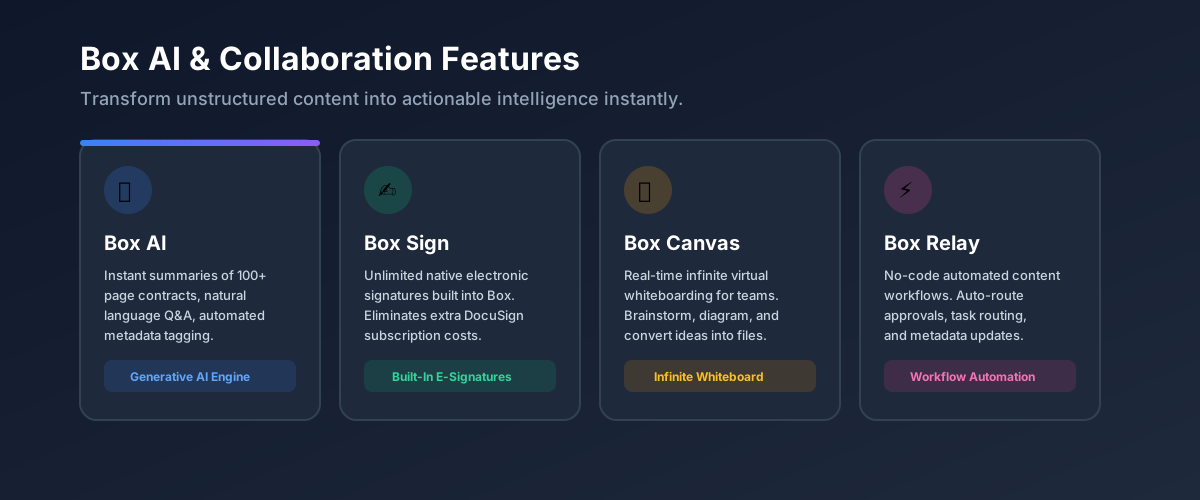
Figure 2: Box AI summarizing multi-page financial reports and answering natural language questions across entire folders.
📄 Instant Document Summarization
Summarize 100-page contracts, legal briefs, research papers, or annual financial reports in seconds with key takeaways and bullet points.
🔍 Multi-Document Folder Q&A
Ask natural language questions across an entire folder of documents (e.g., "Which client agreements expire in Q3?") and receive cited answers instantly.
✏️ Automated Content Drafting
Generate press releases, meeting summaries, email copy, and project charters inside Box Notes based on existing project documents.
9, 10 & 11. Core Productivity Tools: Box Drive, Box Notes & Box Canvas
💻 Box Drive: Virtual Desktop File Streaming
Box Drive connects your cloud files directly to macOS Finder and Windows File Explorer. Instead of downloading full file catalogs to local hard drives, Box Drive streams files on demand. Employees can double-click files, edit them natively in applications like Microsoft Excel or Adobe Illustrator, and save them—automatically syncing changes back to the cloud without eating up local drive storage.
📝 Box Notes: Real-Time Team Documentation
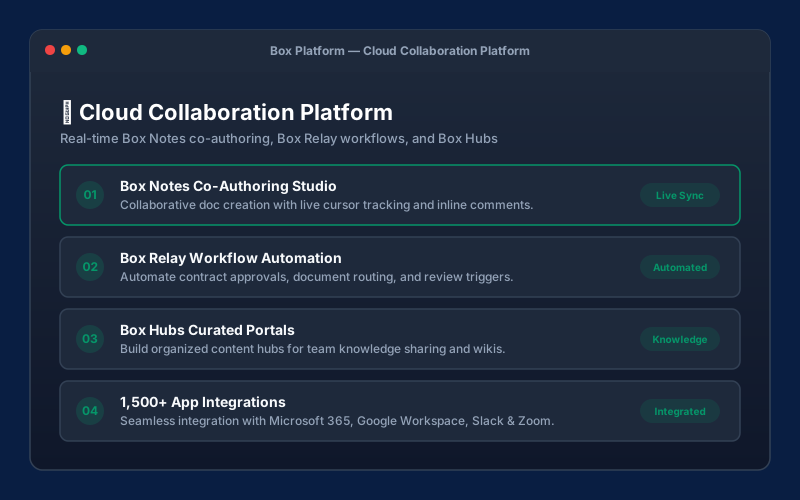
Box Notes is a lightweight, real-time document co-authoring tool built right into Box. Teams can draft meeting agendas, track weekly task items, create project roadmaps, and share notes with internal team members and external stakeholders without licensing separate document editing software.
🎨 Box Canvas: Infinite Visual Whiteboarding
Box Canvas adds an infinite virtual whiteboarding workspace to the Box Content Cloud. Remote and hybrid teams can conduct visual brainstorming sessions, map UX workflows, drop sticky notes, sketch diagrams, and save visual canvases directly into their secure Box folder structure.
12 & 13. Workflow Automation (Box Relay) & Native E-Signatures (Box Sign)
Manual document routing, contract approvals, and signature collection slow down business velocity. Box solves this bottleneck by combining Box Relay workflow automation with Box Sign native digital signatures.
⚡ Box Relay Workflow Automation
Create no-code, multi-step automated triggers. For example, when a vendor uploads an invoice, Box Relay automatically notifies finance, requests approval, tags metadata, moves the file to "Approved Invoices", and triggers a payment workflow.
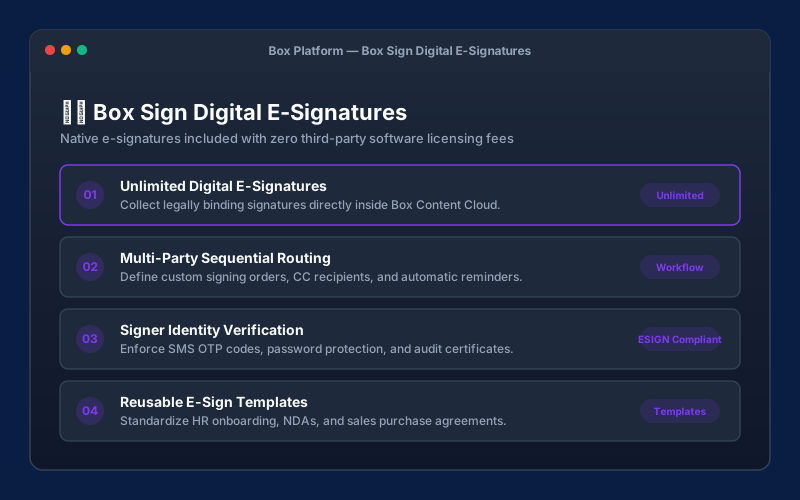
✍️ Box Sign Native E-Signatures
Request legally binding signatures on NDAs, sales contracts, and HR forms directly inside Box. Supports sequential signing orders, reusable templates, SMS authentication, and downloadable tamper-proof audit certificates.
14 & 15. Enterprise Security Architecture & Regulatory Compliance
Security and compliance represent the cornerstone of Box’s market reputation. For companies operating in healthcare, financial services, legal, and government sectors, Box offers unmatched protection mechanisms:
- Box Shield Automated AI Threat Detection: Uses machine learning to detect abnormal download spikes, impossible travel logins, and potential ransomware threats in real time while classifying sensitive data with automated Data Loss Prevention (DLP) labels.
- Box KeySafe Customer Encryption Keys: Enables organizations to maintain exclusive control over their encryption keys stored in Hardware Security Modules (HSMs), ensuring that not even Box engineers can decrypt customer data.
- Box Zones Data Residency: Satisfies strict data sovereignty requirements by allowing enterprises to store content regionally across the US, Europe, Asia, and Australia.
- Global Compliance Certifications: Full compliance with HIPAA (with signed BAAs), FedRAMP High, PCI-DSS Level 1, ISO 27001, SOC 1/2/3, FINRA Rule 4511, GDPR, and CCPA.
16. 1,500+ Ecosystem Integrations (Microsoft, Google, Salesforce, Slack, Zoom)
One of Box’s greatest strengths is its platform neutrality. While tech giants like Microsoft and Google encourage lock-in to their respective walled gardens, Box integrates seamlessly across competing productivity ecosystems.
Co-author Word, Excel, and PowerPoint files in real time directly within Microsoft Teams or web browsers.
Create and edit Google Docs, Sheets, and Slides while storing the assets inside Box's secure security perimeter.
Attach Box contracts directly to Salesforce opportunity records and trigger automated Box Sign signature requests.
Share Box file previews inside Slack channels and automatically save Zoom cloud meeting recordings into Box.
Official Box Content Cloud Product Walkthrough Video
19. Box Pricing Plans, Free Tier & Discount Offers (2026)
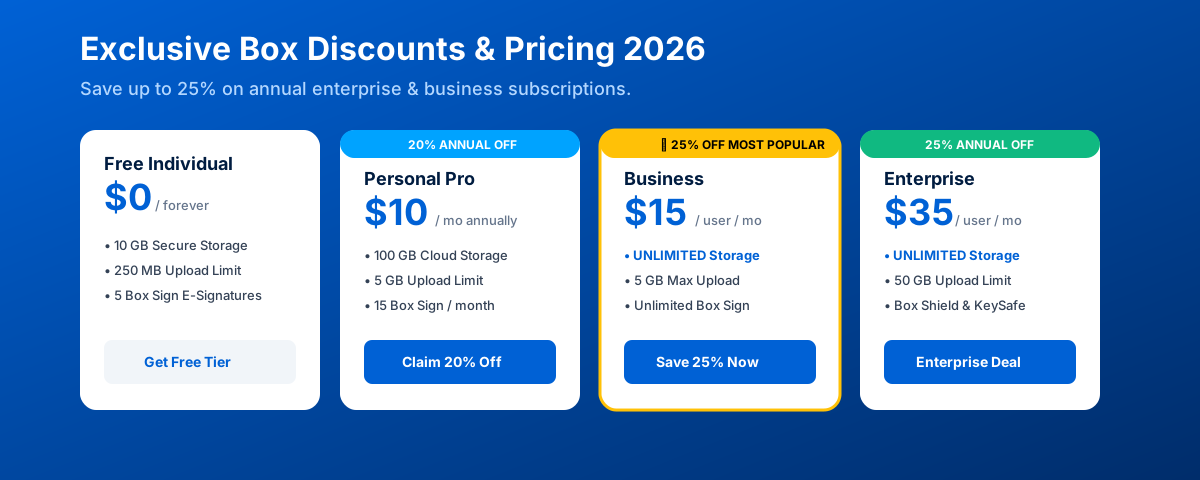
Box provides flexible subscription tiers tailored for individual professionals, small teams, growing businesses, and global enterprises. Paying annually unlocks an official up to 25% discount across business plans.
| Box Plan | Price (Billed Annually) | Storage Limit | Max Upload Limit | Key Included Capabilities |
|---|---|---|---|---|
| Individual Free | 100% FREE | 10 GB | 250 MB | Box Drive access, 5 Box Sign e-signatures/mo, basic sharing. |
| Personal Pro | $10.00 / mo | 100 GB | 5 GB | 15 Box Sign e-signatures/mo, 10 previous version restores. |
| Business Starter | $5.00 / user / mo | 100 GB (3-10 users) | 2 GB | Granular permissions, 25 Box Sign requests/mo, technical support. |
| Business (Popular ⭐) | $15.00 / user / mo | UNLIMITED | 5 GB | Unlimited Box Sign e-signatures, Box Relay workflows, Microsoft/Google integrations. |
| Business Plus | $25.00 / user / mo | UNLIMITED | 15 GB | Unlimited external collaborators, Box AI queries, advanced user reporting. |
| Enterprise & Plus | $35.00+ / user / mo | UNLIMITED | Up to 150 GB | Box Shield AI protection, KeySafe HSM keys, HIPAA/FedRAMP compliance. |
20. Feature Comparison: Box vs. Dropbox vs. Google Drive
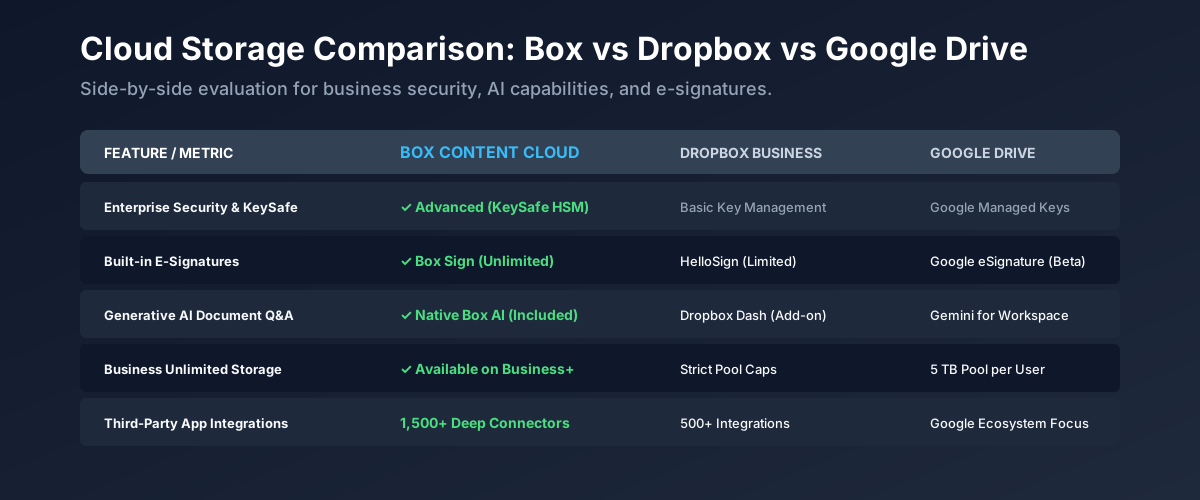
To help you make an informed decision, here is an objective comparison between Box, Dropbox Business, and Google Workspace:
| Feature / Metric | Box Content Cloud | Dropbox Business | Google Workspace |
|---|---|---|---|
| Primary Positioning | Intelligent Content Management Platform | Desktop File Sync & Sharing | Office Productivity Suite |
| Business Storage Capacity | Unlimited (Business Plans) | Capped per user (5TB+) | Capped per tier (2TB - 5TB) |
| Native Generative Document AI | Box AI (Folder Q&A + Summaries) | Dropbox AI (Basic File Q&A) | Gemini for Workspace (Add-on) |
| Native E-Signature Tool | Box Sign (Included Unlimited) | Dropbox Sign (SignEasy/HelloSign) | Requires 3rd-Party App |
| Customer Encryption Keys | Box KeySafe (Dedicated HSMs) | Limited Enterprise Key Management | Client-side encryption available |
| Third-Party Integrations | 1,500+ (MS Office & Google) | 500+ Integrations | Google Ecosystem Focused |
21 & 22. Pros, Cons & Who Box Is Best For
Key Advantages (Pros)
- Truly Unlimited Storage: No cap on Business and Enterprise annual plans.
- Consolidated Feature Suite: Includes Box AI, Box Drive, Box Sign, Box Notes, and Box Canvas.
- Bank-Grade Security: KeySafe HSM keys, Box Shield threat detection, and HIPAA compliance.
- 1,500+ Integrations: Works with Microsoft 365, Google Workspace, Salesforce, and Slack.
- No Lock-In: Ecosystem neutral architecture.
Minor Considerations (Cons)
- Free Tier Upload Limit: Individual free tier restricts single uploads to 250 MB.
- Higher Minimum User Count: Business tiers require a minimum of 3 user licenses.
- Feature Richness Learning Curve: Admin console offers immense depth requiring brief initial setup.
🎯 Who Is Box Best For?
Box is ideal for growing companies, mid-sized teams, healthcare providers, legal practices, financial firms, and enterprises that require centralized document governance, automated approval workflows, native electronic signatures, and zero-trust security.
23. Top Box Alternatives & Competitors
- Dropbox Business: Stronger for individual creative professionals focused on simple desktop file sync, though lacking Box's deep workflow automation and native zero-trust compliance certifications.
- Google Workspace (Google Drive): Excellent for startups heavily reliant on web-based Google Docs, but capped on storage and lacking native customer-managed HSM keys.
- Microsoft OneDrive / SharePoint: Ideal for organizations strictly locked into the Microsoft Azure/Entra infrastructure, though less versatile when co-authoring across non-Microsoft tools.
- Egnyte: A niche alternative for hybrid on-premises architecture, though offering fewer out-of-the-box integrations than Box's 1,500+ app directory.
24. Frequently Asked Questions (FAQ)
What is Box and how does it differ from traditional cloud storage?
Box is an AI-powered Intelligent Content Management Platform. Unlike basic consumer cloud drives designed solely for uploading static files, Box unifies secure cloud storage, document management, team collaboration, Box AI, Box Drive desktop streaming, native Box Sign e-signatures, Box Notes, Box Canvas, and workflow automation in a single compliant workspace.
Why do businesses choose Box over Google Drive or Dropbox?
Businesses choose Box because of its enterprise security architecture, native generative AI capabilities (Box AI), unlimited business storage, zero-trust governance, 1,500+ ecosystem integrations (including both Microsoft 365 and Google Workspace), and compliance certifications like HIPAA, FedRAMP, and FINRA.
How does Box AI work with business documents?
Box AI integrates generative AI directly into your repository. It allows users to summarize complex legal or financial documents, query full folders of files in natural language, draft content inside Box Notes, and extract critical metadata clauses automatically.
What is Box Drive and how does it save local hard drive space?
Box Drive is a desktop app for macOS Finder and Windows File Explorer that streams your complete cloud file structure locally without consuming hard drive space until files are pinned offline.
Are digital signatures included with Box subscriptions?
Yes! Box Sign is Box's native e-signature tool included across Box plans. It enables legally binding signature requests, multi-signer workflows, and audit certificates without requiring separate third-party subscriptions like DocuSign.
Is Box compliant with HIPAA, GDPR, and FedRAMP?
Yes, Box offers dedicated compliant environments for healthcare (HIPAA BAAs), federal government agencies (FedRAMP High), financial institutions (FINRA), and global enterprises (GDPR, ISO 27001, SOC 1/2/3).
25. Final Verdict: Is Box Worth Buying in 2026?
After conducting hands-on testing across admin controls, file streaming speeds, Box AI query accuracy, and security compliance options, our final verdict is a clear 4.8 out of 5.0 stars.
Box is no longer just a cloud storage provider; it is the industry benchmark for AI-powered Intelligent Content Management. By replacing fragmented tools with a single unified solution featuring unlimited cloud storage, Box AI, Box Drive, Box Sign e-signatures, Box Notes, Box Canvas, and zero-trust security, Box delivers outstanding value for modern businesses.
Upgrade Your Workspace with Box Today
Claim up to 25% OFF Box Business and Enterprise annual plans. Includes unlimited cloud storage, Box AI, Box Sign e-signatures, and a 14-day risk-free trial.